I went to a friend house last nite..
He got streamyx and also wifi..
His wifi however.. protected with WPA2 + PSK auth…
/sbin/iwlist eth1 scan
would return something like this..
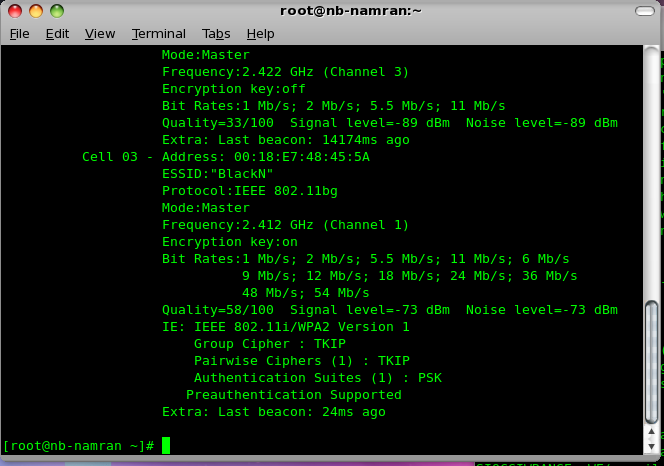
Got some sort of key..*sigh*
But I was only used to play with just WEP configuration and the passphrase based auth.
Gee… how to get my Cent OS online on this WPA2 enabled wifi network?
well.. after few minute fiddling with.. got fed up.. so just asked him to turn it off and we play the PS3 instead..
muahaha.. (trying so damn hard to get that “ultra combo move” triggered…)

back at home.. (managed to re-create this scenario..). time to play..
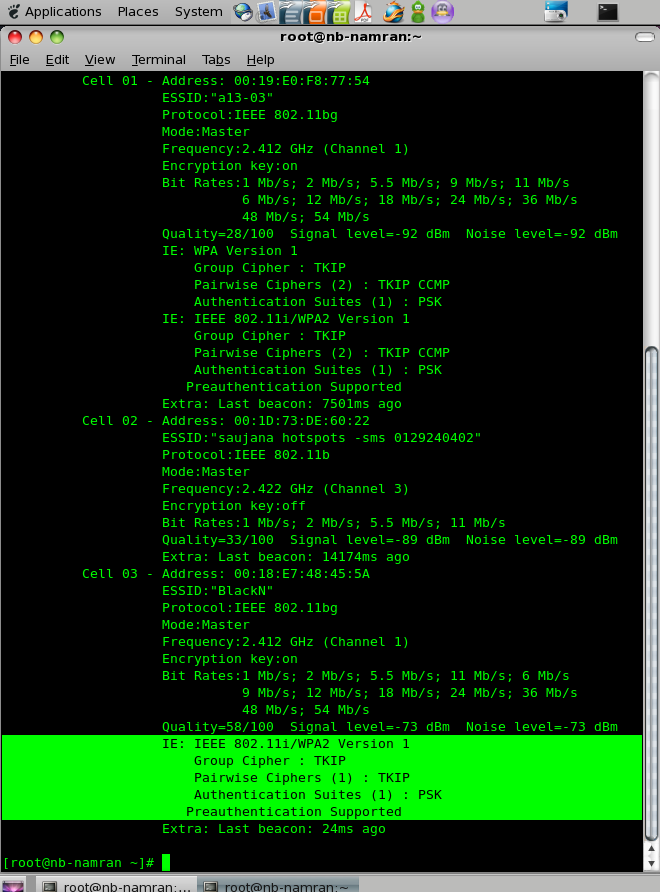
tried few time with..
[root@nb-namran ~]# which wpa_supplicant
/usr/sbin/wpa_supplicant
[root@nb-namran ~]# rpm -q --whatprovides /usr/sbin/wpa_supplicant
wpa_supplicant-0.5.10-8.el5
[root@nb-namran ~]# wpa_supplicant -help
wpa_supplicant v0.5.10
Copyright (c) 2003-2008, Jouni Malinen  and contributors

This program is free software. You can distribute it and/or modify it
under the terms of the GNU General Public License version 2.

Alternatively, this software may be distributed under the terms of the
BSD license. See README and COPYING for more details.

This product includes software developed by the OpenSSL Project
for use in the OpenSSL Toolkit (http://www.openssl.org/)

usage:
  wpa_supplicant [-BddhKLqqtuvwW] [-P
] [-g] \
        -i -c [-C] [-D] [-p] \
        [-b] [-f] \
        [-N -i -c [-C] [-D] \
        [-p] [-b] ...]

drivers:
  wext = Linux wireless extensions (generic)
  hostap = Host AP driver (Intersil Prism2/2.5/3)
  prism54 = Prism54.org driver (Intersil Prism GT/Duette/Indigo)
  madwifi = MADWIFI 802.11 support (Atheros, etc.)
  atmel = ATMEL AT76C5XXx (USB, PCMCIA)
  ndiswrapper = Linux ndiswrapper
  wired = wpa_supplicant wired Ethernet driver
options:
  -b = optional bridge interface name
  -B = run daemon in the background
  -c = Configuration file
  -C = ctrl_interface parameter (only used if -c is not)
  -i = interface name
  -d = increase debugging verbosity (-dd even more)
  -D = driver name
  -f = log output to debug file instead of stdout (default: /var/log/wpa_supplicant.log)
  -g = global ctrl_interface
  -K = include keys (passwords, etc.) in debug output
  -t = include timestamp in debug messages
  -h = show this help text
  -L = show license (GPL and BSD)
  -p = driver parameters
  -P = PID file
  -q = decrease debugging verbosity (-qq even less)
  -u = enable DBus control interface
  -v = show version
  -w = wait for interface to be added, if needed
  -W = wait for a control interface monitor before starting
  -N = start describing new interface
example:
  wpa_supplicant -Dwext -iwlan0 -c/etc/wpa_supplicant.conf
[root@nb-namran ~]#
Hmm..
my wifi device is at eth1 .. though..
[root@nb-namran ~]# ipw3945d
ipw3945d - regulatory daemon
Copyright (C) 2005-2006 Intel Corporation. All rights reserved.
version: 1.7.22
2009-07-14 02:10:09: ERROR: ipw3945d already running.  If ipw3945d is not running then you
need to remove '/var/run/ipw3945d.pid' and try again.
then..
[root@nb-namran ~]# rpm -ql wpa_supplicant
/etc/dbus-1/system.d/wpa_supplicant.conf
/etc/logrotate.d/wpa_supplicant
/etc/rc.d/init.d/wpa_supplicant
/etc/sysconfig/wpa_supplicant
/etc/wpa_supplicant
/etc/wpa_supplicant/wpa_supplicant.conf
/usr/sbin/wpa_cli
/usr/sbin/wpa_passphrase
/usr/sbin/wpa_supplicant
/usr/share/dbus-1/system-services/fi.epitest.hostap.WPASupplicant.service
/usr/share/doc/wpa_supplicant-0.5.10
/usr/share/doc/wpa_supplicant-0.5.10/COPYING
/usr/share/doc/wpa_supplicant-0.5.10/ChangeLog
/usr/share/doc/wpa_supplicant-0.5.10/README
/usr/share/doc/wpa_supplicant-0.5.10/eap_testing.txt
/usr/share/doc/wpa_supplicant-0.5.10/examples
/usr/share/doc/wpa_supplicant-0.5.10/examples/ieee8021x.conf
/usr/share/doc/wpa_supplicant-0.5.10/examples/plaintext.conf
/usr/share/doc/wpa_supplicant-0.5.10/examples/wep.conf
/usr/share/doc/wpa_supplicant-0.5.10/examples/wpa-psk-tkip.conf
/usr/share/doc/wpa_supplicant-0.5.10/examples/wpa2-eap-ccmp.conf
/usr/share/doc/wpa_supplicant-0.5.10/todo.txt
/usr/share/doc/wpa_supplicant-0.5.10/wpa_supplicant.conf
/usr/share/man/man5/wpa_supplicant.conf.5.gz
/usr/share/man/man8/wpa_background.8.gz
/usr/share/man/man8/wpa_cli.8.gz
/usr/share/man/man8/wpa_passphrase.8.gz
/usr/share/man/man8/wpa_supplicant.8.gz
/var/run/wpa_supplicant
oh.. got gui..
/usr/bin/wpa_gui
but.. somehow no adapter..
how da heck am i to add new adapter to it..
# WPA-PSK/TKIP

ctrl_interface=/var/run/wpa_supplicant

network={
  ssid="example wpa-psk network"
  key_mgmt=WPA-PSK
  proto=WPA
  pairwise=TKIP
  group=TKIP
  psk="secret passphrase"
}
and ..
network={
  ssid="example wpa2-eap network"
  key_mgmt=WPA-EAP
  proto=WPA2
  pairwise=CCMP
  group=CCMP
  eap=TLS
  ca_cert="/etc/cert/ca.pem"
  private_key="/etc/cert/user.p12"
  private_key_passwd="PKCS#12 passhrase"
}
Hmm.. i guess i just do this..
edit the /etc/wpa_supplicant/wpa_supplicant.conf to become such as ..
network={
  ssid="BlackN"
  key_mgmt=WPA-PSK
  proto=WPA2
  pairwise=TKIP
  group=TKIP
  psk="secret passphrase"
}
then i run..
/usr/sbin/wpa_supplicant -B -dd -i eth1 -c /etc/wpa_supplicant/wpa_supplicant.conf
it successfully run..and daemonized..
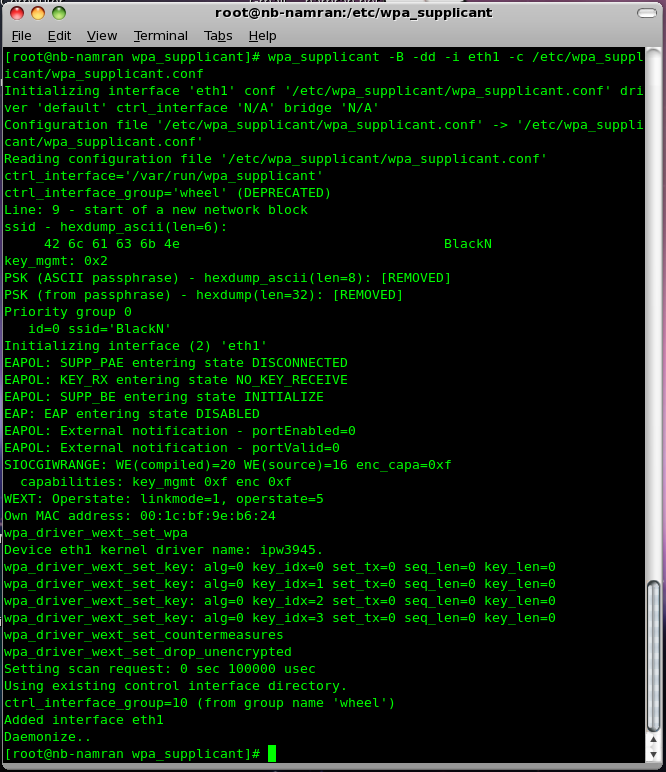
then..
/usr/bin/wpa_gui
wah.. this time got eth1 as adapter..
use the scan button.. to scan..
can see one of my “WPA2+PSK enabled” network are there..
double click.. ~ wah..~

enter passphrase… then associated..
but no ip address..
/sbin/dhclient eth1
got this..
[root@nb-namran ~]# dhclient eth1
Internet Systems Consortium DHCP Client V3.0.5-RedHat
Copyright 2004-2006 Internet Systems Consortium.
All rights reserved.
For info, please visit http://www.isc.org/sw/dhcp/

Listening on LPF/eth1/00:1c:bf:9e:b6:24
Sending on   LPF/eth1/00:1c:bf:9e:b6:24
Sending on   Socket/fallback
DHCPDISCOVER on eth1 to 255.255.255.255 port 67 interval 5
DHCPDISCOVER on eth1 to 255.255.255.255 port 67 interval 6
DHCPDISCOVER on eth1 to 255.255.255.255 port 67 interval 15
DHCPDISCOVER on eth1 to 255.255.255.255 port 67 interval 17
receive_packet failed on eth1: Network is down
DHCPDISCOVER on eth1 to 255.255.255.255 port 67 interval 18
send_packet: Network is down
No DHCPOFFERS received.
No working leases in persistent database - sleeping.
first few times ..failed..darn.. but wifi is associated..
let’s try manually set ip address..
/sbin/ifconfig eth1 192.168.133.249
successfully established..
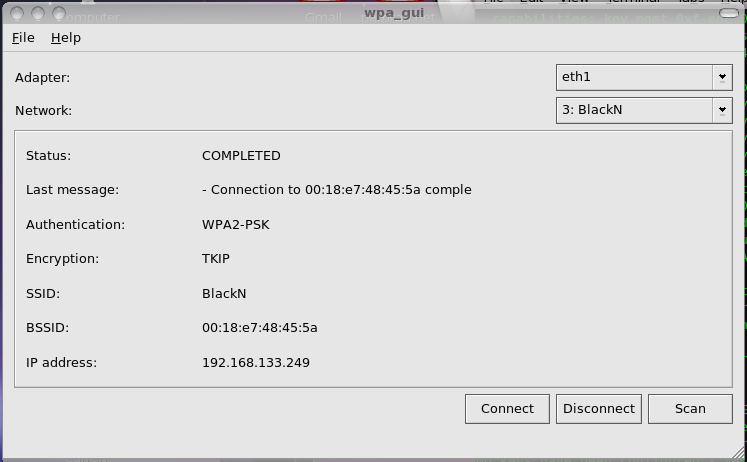
Hmm..
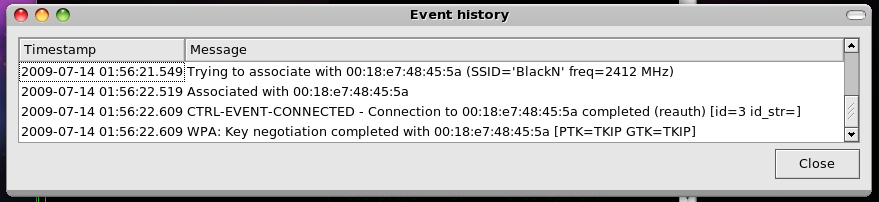
then ping the gateway.. hahaha..
ping 192.168.133.1
seem fine..
/sbin/ifdown eth1
ifdown eth0
ifdown lo
dhclient eth1
got this..
[root@nb-namran ~]# dhclient eth1
Internet Systems Consortium DHCP Client V3.0.5-RedHat
Copyright 2004-2006 Internet Systems Consortium.
All rights reserved.
For info, please visit http://www.isc.org/sw/dhcp/

Listening on LPF/eth1/00:1c:bf:9e:b6:24
Sending on   LPF/eth1/00:1c:bf:9e:b6:24
Sending on   Socket/fallback
DHCPREQUEST on eth1 to 255.255.255.255 port 67
DHCPREQUEST on eth1 to 255.255.255.255 port 67
DHCPNAK from 192.168.133.254
DHCPDISCOVER on eth1 to 255.255.255.255 port 67 interval 8
send_packet: Network is down
DHCPDISCOVER on eth1 to 255.255.255.255 port 67 interval 12
DHCPOFFER from 192.168.133.254
DHCPREQUEST on eth1 to 255.255.255.255 port 67
DHCPACK from 192.168.133.254
bound to 192.168.133.250 -- renewal in 8216 seconds.
then..it is connected.. muahaha..
great..
to get it automatically run during start up..
I guess just need append these into /etc/rc.local
/usr/sbin/wpa_supplicant -B -dd -i eth1 -c /etc/wpa_supplicant/wpa_supplicant.conf.
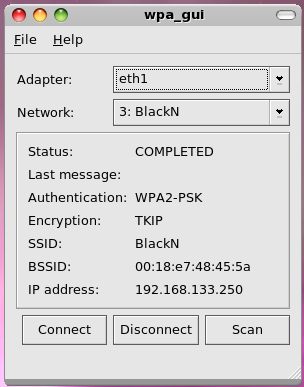
ok.. done..
p/s : can now go to sleep..
to use maybank2u over the free and unprotected hotspot.. ~ is dangerous..
Inspired by this log ,
I somehow managed to get a few server updated the OpenSSH with the
yum update openssh-server -y
with one got kernel panic..~ failed..~
The rugged look of fringe remains popular, while the feel of leather instills a natural style.