The laptop have something like the following for the
lspci output
]# lspci

05:00.0 Ethernet controller: Realtek Semiconductor Co., Ltd. RTL8101E/RTL8102E PCI Express Fast Ethernet controller (rev 05)

09:00.0 Network controller: Broadcom Corporation BCM4313 802.11b/g/n Wireless LAN Controller (rev 01)
grab the driver from the broadcom website. here
wget http://www.broadcom.com/docs/linux_sta/hybrid-portsrc_x86_32-v5_100_82_38.tar.gz
then install all the necessary kernel-devel and header
For 32-bit
yum install kernel-headers kernel-devel gcc -y
For PAE.
this laptop have 4GB .. it have kernel-PAE installed by default.
[root@nb ~]# uname -a
Linux nb.namran.net 2.6.18-274.3.1.el5PAE #1 SMP Tue Sep 6 20:56:05 EDT 2011 i686 i686 i386 GNU/Linux
which could lead to some problem with just above library..
yum install kernel-PAE-devel -y
then extract the source code into somewhere
mkdir /usr/local/wifi/
cd /usr/local/wifi
# extract the zip
tar xvfz ~/Desktop/hybrid-portsrc_x86_32-v5_100_82_38.tar.gz
edit something inside the /usr/local/wifi/src/include/typedefs.h
/*
#ifndef TYPEDEF_BOOL
typedef  unsigned char  bool;
#endif
*/
and also another file at /usr/local/wifi/src/include/linuxver.h
/* typedef void (*work_func_t)(void *work); */
then compile
make -C /lib/modules/`uname -r`/build M=`pwd`
test load with ..
modprobe ieee80211_crypt_tkip
insmod wl.ko
inspect dmesg
it should have something like following ..
eth1: RTL8101e at 0xf89b4000, 18:03:73:68:27:d2, XID 00a00000 IRQ 177
then.. time to make it permanent..
strip --strip-debug wl.ko
 cp wl.ko  /lib/modules/`uname -r`/extra/
depmod $(uname -r)
edit the /etc/modprobe.d/blacklist
add the following
blacklist bcm43xx
blacklist ndiswrapper
blacklist b43
blacklist b43legacy
and ..
/etc/modprobe.d/modprobe.conf.dist
alias ieee80211_crypt_tkip ieee80211_crypt_tkip
alias eth1 wl
..
finally
/etc/modprobe.conf
alias eth1 wl
then reboot the system..
you should now able to see eth1 as wireless interface
inside the system-config-network
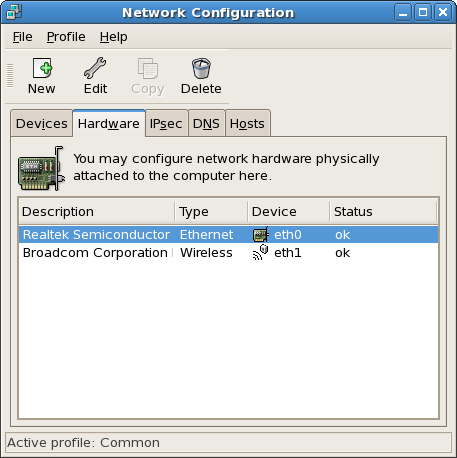
yay !
now time to get it connected to wireless..
service network stop
service NetworkManager start
# autostart during bootup
chkconfig network off
chkconfig NetworkManager on
then the nice GUI will appear at the task bar..
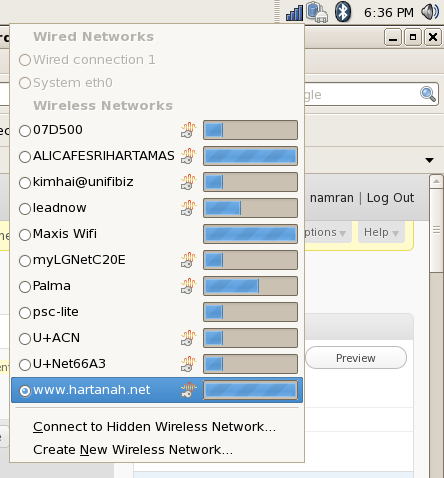
at which you can keyin the security secrets and everything there as per you wireless enviroment..
p/s : .. hmm..it doesn’t support WEP 64-bit encryption anymore..
need WPA/WPA2 or WEP-128-bit.
Dell Inspiron 14 – N4050 very good