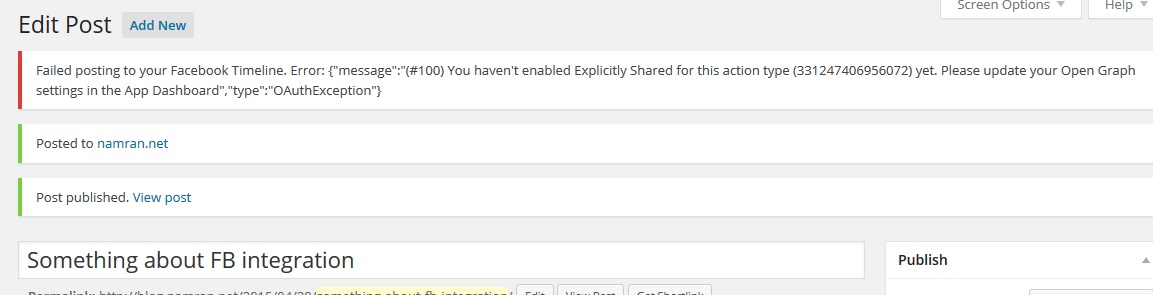
After publish a post , it state something like the following.
“Failed posting to your Facebook timeline.
Error:{“message”:”(#100)You haven’t enabled Explicitly Shared for this action type ( ACTION_CODE_NO_HERE ) yet.”
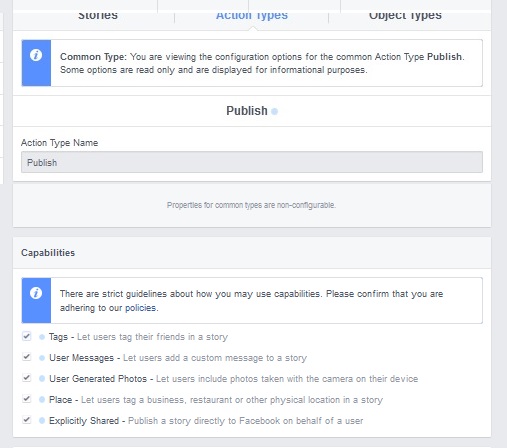
Fixing it , is by going to app Open Graph. click on Action Type.
Find the desired Action Code by mouse-over and see the matching code number.
Click advance. then at “Capabilities”.
Tick. the bottom most “Explicitly Shared – Publish a story ..”
References :
https://developers.facebook.com/docs/sharing/best-practices#permissions
Here are five key communication skills that help you speak with clarity and influence: Speak…
Are you ready to unlock your full potential as a man?Discover powerful insights, real-life transformations,…
One day we will set aside one whole day to review the whole lesson we…
Last weekend, 07/12/2024 I managed to join Dev Fest Kuala Lumpur 2024, organized by Google…
TIPS BACAAN AL-QURANOleh: Dr. Muhd al-Muhaysni.1. Jangan engkau berikan (fokus membaca) al-Quran pada lebihan waktumu…
Selawat yang ringkas, yang mana apabila kamu membacanya satu kali sebanding 100 ribu kali, jadi…
Leave a Comment