One friend seek a help to format his “Acer Aspire 4530” laptop..
It comes with a “Windows Vista 32-bit”.. but somehow the “OS” got corrupted , unable to boot…
Suspecting some BIOS problem according to here.
Asked for the original CD/DVD for recovery ..
“Oh.. tertinggal kat johor.. takleh buat ke takde cd?”
Hmm..eventually only managed to have “Windows XP SP3” DVD..
to get the “Windows XP SP3” installed on this laptop..
First.. changed the “Hardisk” SATA configuration in BIOS to become “IDE” mode..
As the “AHCI” is not a default supported by “Windows XP – SP3”..
“AHCI” its only comes after the “Windows XP” era..
too lazy to find ways to get around that ..
so changed to IDE instead..
as the end-user wouldn’t really care if had missed the beauty of “AHCI” & “Native Command Queuing” technology ..anyway..
After done with installation of “Windows XP – SP3”..
Download and install the “Updates” from “Microsoft Download Center”..
Get all the driver from Acer website , as there can specify what OS driver to downloaded..
All other can be detected properly …
nvidia graphic- ok..
atheros wireless -ok..
synaptic touchpad – ok…
card reader -ok..
webcam -ok..
chipset -ok..
[ad#postad]
except for :
HD Audio Realtek — failed.. no sound.
HD Enabled Modem — failed..
Hmm.. a few google search.. turn out to be ..
It need addons “Microsoft UAA Bus Driver for High Definition Audio Driver ” / “Universal Audio Architecture (UAA) High Definition Audio class driver”
for Windows Server 2003, Windows XP, and Window 2000..
which is can be requested from here [support.microsoft.com].
which need to provide email address… and it will send the link to the email..
the archive file provided is “protected” with password that will expire within 7days..
and the files is about 67.5Mb… (bloody fat)..
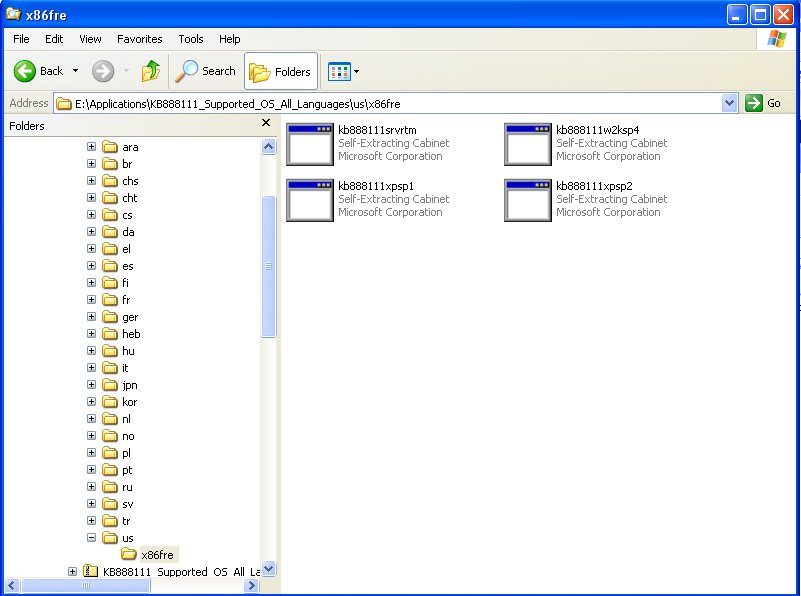
Eventually you only need a file inside there named as “kb888111xpsp2.exe” under “us” folder..
[namran@nb-namran x86fre]$ ll -h kb888111xpsp2.exe
-rw-rw-r-- 1 namran namran 704K Jan 10  2005 kb888111xpsp2.exe
now.. to install that patch..it will complain as not matching current running system..
(is “Service Pack 3 – SP3 ” while the patch is meant for “SP2”)..
and trick to turn to be..
Step 1: Run Regedit by Clicking on Start -> Run , type in regedit and press enter
“Start->run” “regedit”
Step 2: Make a backup of your registry (just in case)
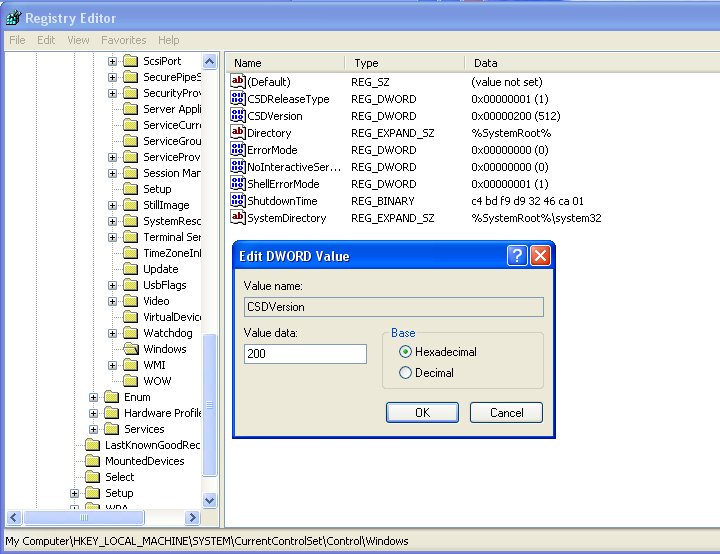
Step 3: Browse to “HKEY_LOCAL_MACHINE\SYSTEM\CurrentControlSet\Control\Windows”
Step 4: Modify the value of “CSDVersion” from “0x00000300” (SP3) to the Windows XP SP2 value of “0x00000200”
Legend:
"0x00000100"  (SP1)
"0x00000200"  (SP2)
"0x00000300"  (SP3)
Step 5: Apply the “UAA Bus Driver for HD Audio” hotfix..
re-run the “hotfix” files above…
after completed..
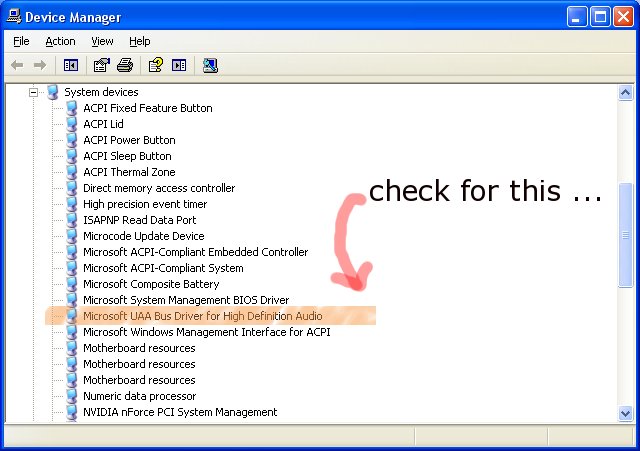
it should detect the “HD Audio Realtek” as below :
Step 6: Revert back the value of “CSDVersion” from “0x00000200” (SP2) to the Windows XP SP3 value of “0x00000300”
get into regedit again and change back that value to “SP3”
( you might need to reboot the system after registry change. )
[ad#postad]
that’s all..
the rest of driver of Realtek HD audio files would be available at the acer website itself..
p/s :
.. someone said its due to the RC for SP3 is not properly include the HD Audio. (goossh..)
Here are five key communication skills that help you speak with clarity and influence: Speak…
Are you ready to unlock your full potential as a man?Discover powerful insights, real-life transformations,…
One day we will set aside one whole day to review the whole lesson we…
Last weekend, 07/12/2024 I managed to join Dev Fest Kuala Lumpur 2024, organized by Google…
TIPS BACAAN AL-QURANOleh: Dr. Muhd al-Muhaysni.1. Jangan engkau berikan (fokus membaca) al-Quran pada lebihan waktumu…
Selawat yang ringkas, yang mana apabila kamu membacanya satu kali sebanding 100 ribu kali, jadi…

View Comments
that is worse than centos and HDA audio!
I've got XPSP3 and sound seems to work on my intel board with HD Audio (after installing all the drivers on the motherboard CD).
btw: You can "slipstream" the AHCI drivers using http://www.nliteos.com/. But I believe the AHCI drivers are motherboard specific, so you may still not have a "universal" AHCI XP installer.
Hello from Russia!
Can I quote a post in your blog with the link to you?