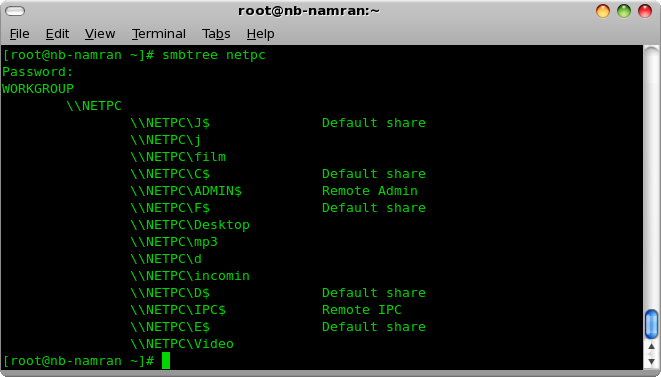
First , need to iterate all the folders that been shared by windows PC.
I prefer putting that windows PC ip address into /etc/hosts
so that it would simplify thing a litle bit.
192.168.199.211 netpc
then on at terminal .
smbtree netpc
next, got the directory and all.
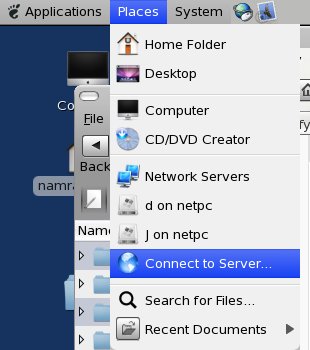
Places-> Connect to server
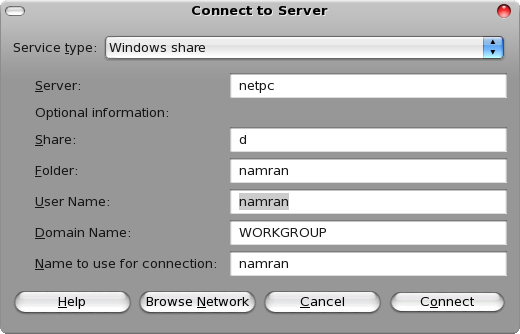
-> select the windows share.enter the detail.
it will then create an icon at Desktop which you can link and open it up in nautilus like a normal directory.
then copying thing is just matter “drag and drop” stuff into that box.
for those who need the package detail :
[root@nb-namran ~]# rpm -q --whatprovides /usr/bin/smbtree
samba-client-3.0.33-3.29.el5_6.2
Here are five key communication skills that help you speak with clarity and influence: Speak…
Are you ready to unlock your full potential as a man?Discover powerful insights, real-life transformations,…
One day we will set aside one whole day to review the whole lesson we…
Last weekend, 07/12/2024 I managed to join Dev Fest Kuala Lumpur 2024, organized by Google…
TIPS BACAAN AL-QURANOleh: Dr. Muhd al-Muhaysni.1. Jangan engkau berikan (fokus membaca) al-Quran pada lebihan waktumu…
Selawat yang ringkas, yang mana apabila kamu membacanya satu kali sebanding 100 ribu kali, jadi…

Leave a Comment