Well, at the time of this writing .. TM Unifi has not yet provide ready-made IPv6 for us.
(probably hidden under some test-bed environment only i.e MYREN network)
Anyway, if you are eager to get hook onto IPv6 now, the choice are either getting a tunnel
IPv6-over-IPv4 .. which is provided by quite a number of provider :
namely :
1. http://gogo6.com (http://freenet6.net)
2. http://www.sixxs.net
3. Hurricane Electric (http://www.tunnelbroker.net)
well, each of them got their own tunnel provided and step.
Tried Gogoc on CentOS, work like charm.. except sometime ..
I had ..
“Failed to TSP.. bla bla”
For sixxs.net , the registration took longer than the others..
so, I just jump to next one.. he.net
After registered, login, create regular tunnel.. wait few moment..
It assigned a ::0/64 for me. . and the script provided for linux too.
copy & paste that script into the router box .. and it just work !
I choose the “Linux-net tools”
ifconfig sit0 up
ifconfig sit0 inet6 tunnel ::216.218.221.42
ifconfig sit1 up
ifconfig sit1 inet6 add 2001:470:3x:1xx::2/64
route -A inet6 add ::/0 dev sit1
well.. then it also routed /64 and /48 such as the following :
Routed IPv6 Prefixes and rDNS Delegations
 Routed /48:  2001:470:xx43::/48
 Routed /64:  2001:470:3y:1xx::/64
then, to route the IPv6 to the whole network behind me ..
I just .. adding the routed network (/64) into my internal LAN interface.
ip addr add 2001:470:3y:1xx::1 dev eth0
Ok, now time to get the Forwarding to works.
echo "1" > /proc/sys/net/ipv6/conf/all/forwarding
or made it permanently .. by adding the following line into /etc/sysctl.conf
# IPv6
net.ipv6.conf.default.forwarding=1
then install the radvad .. (some said it is kind of DHCP server for IPv6 )
yum install radvd -y
then configure the radvd to advertise the IPv6 internally..
something like the following :
interface eth0 {
        AdvSendAdvert on;
        MinRtrAdvInterval 3;
        MaxRtrAdvInterval 10;
        prefix 2001:470:3y:1xx::/64 {
                AdvOnLink on;
                AdvAutonomous on;
                AdvRouterAddr on;

        };
        route 2001:470:xx43::/48
        {
                AdvRoutePreference high;
                AdvRouteLifetime 3600;
        };


};
chmod a-w /etc/radvd.conf
service radvd start
then try monitoring it for few moment..
radvdump
it should had something like the following..
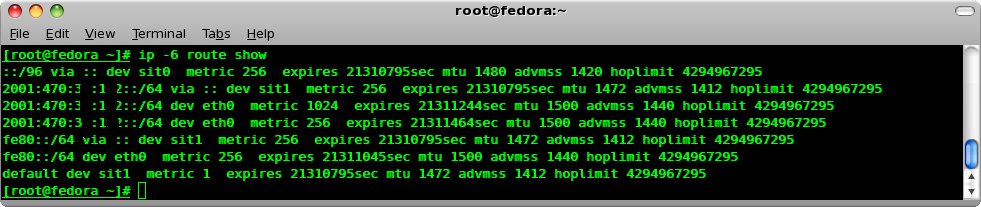
verifying using the following command :
ip -6 route show
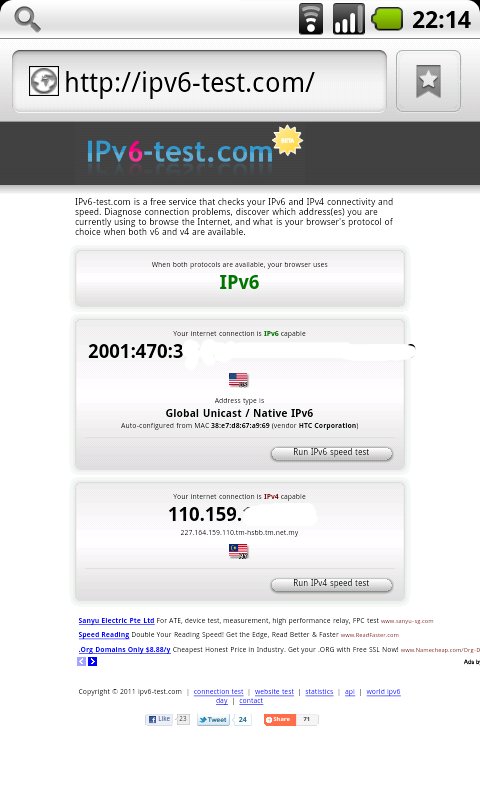
then clients .. such as nexus one, htc wildfire will pickup the IPv6 automatically..
as this box also had DHCP server running for IPv4.
so.. now ..
http://ipv6.namran.net is alive.. (only reachable via IPv6 infra as it set to listening to ipv6 interface only) yay !
Credit goes to .sha..
and following reference :
1. http://www.tunnelbroker.net/forums/index.php?topic=1442.0
Here are five key communication skills that help you speak with clarity and influence: Speak…
Are you ready to unlock your full potential as a man?Discover powerful insights, real-life transformations,…
One day we will set aside one whole day to review the whole lesson we…
Last weekend, 07/12/2024 I managed to join Dev Fest Kuala Lumpur 2024, organized by Google…
TIPS BACAAN AL-QURANOleh: Dr. Muhd al-Muhaysni.1. Jangan engkau berikan (fokus membaca) al-Quran pada lebihan waktumu…
Selawat yang ringkas, yang mana apabila kamu membacanya satu kali sebanding 100 ribu kali, jadi…

View Comments
bro macam mana nak setting utk ipv4 untuk connect ke unifi.
Hi,
well, I 'm a newbie to ipv6(and many other things).
I'm a unifi subscriber VIP5.
I'd like to set up a home network comprising a laptop and a pc, to be able to ping each other and outside world using IPv6.
At the first step, I want to be able to ping ipv6.google.com
currenly I'm running ubuntu on my laptop.
I followed your instruction to register with he.net and got the same script. however I don't know what you mean by copy& pasting it into "your router box"? can you help me? Thanx