Once in a while , whenever I checked my disk space usage ..
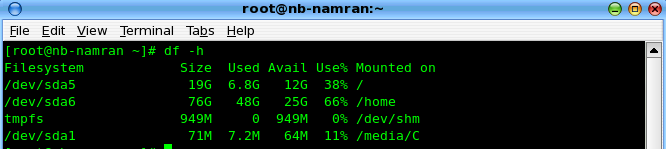
for / it goes up to 90% and left barely 1Gb out of 19Gb..
so whenever I did a yum install <bigthing>
it complain space insufficient..
it was allocated 19Gb for / .. and the rest goes to /home..
19Gb would be doubled of what being needed to do a full package install of CentOS.. as it only require upto 8-9 Gb..
was thinking to re-format this whole thing.. but wait.. may be it just time to do some clean up..
goes into runlevel 3 with
telinit 3
remove all temporary file
rm -rf /tmp/*
rm -rf /var/tmp/*
remove old kernel and kernel-devel
rpm -q kernel
yum remove kernel-<old-version-number>
and recheck the disk usage..
Hmm..
Seem back to normal.. don’t need to re-format.. Yay~
Here are five key communication skills that help you speak with clarity and influence: Speak…
Are you ready to unlock your full potential as a man?Discover powerful insights, real-life transformations,…
One day we will set aside one whole day to review the whole lesson we…
Last weekend, 07/12/2024 I managed to join Dev Fest Kuala Lumpur 2024, organized by Google…
TIPS BACAAN AL-QURANOleh: Dr. Muhd al-Muhaysni.1. Jangan engkau berikan (fokus membaca) al-Quran pada lebihan waktumu…
Selawat yang ringkas, yang mana apabila kamu membacanya satu kali sebanding 100 ribu kali, jadi…
Leave a Comment