
Let’s say you have an account in Amazon Web Services (AWS) and got some instance running under an Elastic Container Services (ECS).
You had it running OK, until suddenly got the bills charging for the CloudWatch usage.
You go in the AWS console and checked the way to disable the Container Insight for the running ECS, and found out there is no button for that.
And need to use aws-cli command as below to disable it.
aws ecs update-cluster-settings --cluster ${clustername} --settings name=containerInsights,value=disabled --region ${AWS_REGION}
And then realised you don’t have aws-cli to run in local at the moment.
Here is how to install the aws-cli in the local machine and get the AWS_SECRET_KEY for the first time.
You start to install it with the following instruction.
curl "https://awscli.amazonaws.com/AWSCLIV2.pkg" -o "AWSCLIV2.pkg"
sudo installer -pkg AWSCLIV2.pkg -target
Then verify the installation is correct with
which aws
it correct it would return the following string
/usr/local/bin/aws
and also
aws --version aws-cli/2.1.13 Python/3.7.4 Darwin/19.6.0 exe/x86_64 prompt/off

After that you need to configure it for the first time using the following command
aws configure
it will prompt to enter the AWS ID, AWS SECRET KEY and region.
You can find this information from the AWS IAM -> Roles -> Security Credentials.
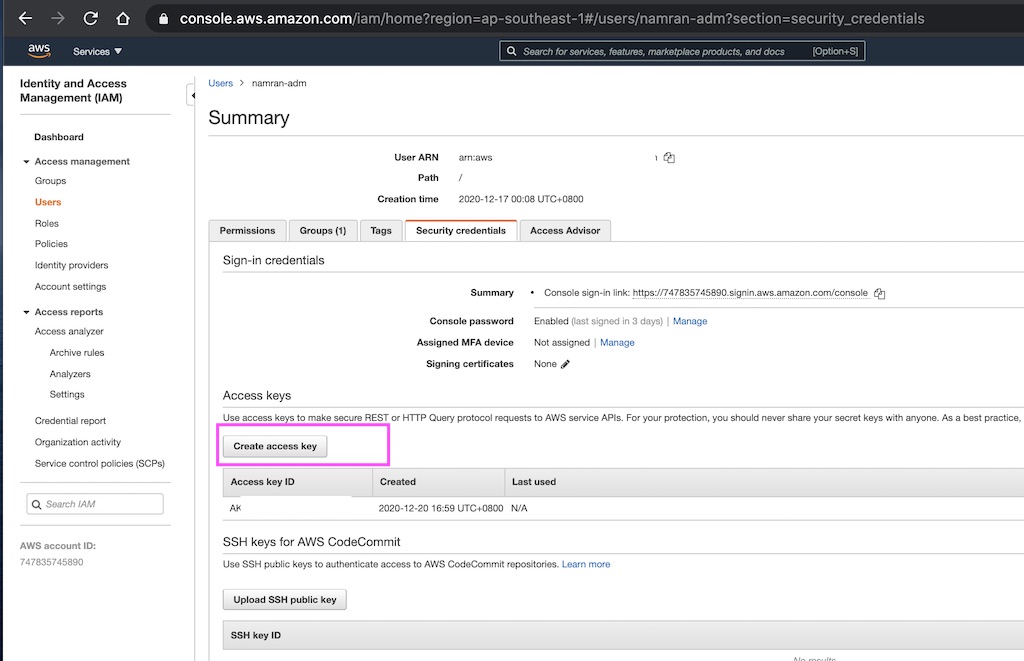
Once logged,
it will create a file under the following folder
~/.aws/config
[default]
region = Singapore
output = json
~/.aws/credential
aws_access_key_id = xxx
aws_secret_access_key = yyyy
after that you can use to disable the container insight with the following command
export AWS_REGION=ap-southeast-1 export clustername=wp-namran aws ecs update-cluster-settings --cluster ${clustername} --settings name=containerInsights,value=disabled --region ${AWS_REGION}
response

Verify again at the console.
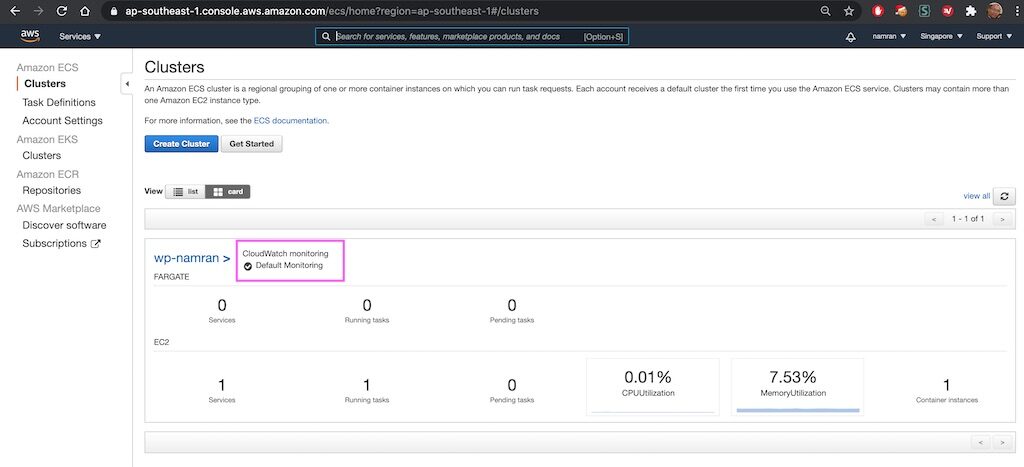
Done, that’s all for now.
refs:
https://docs.aws.amazon.com/cli/latest/userguide/cli-services-iam-create-creds.html
https://ecsworkshop.com/container_insights/cleanup/
Asking questions are reallyy fasyidious thin if yoou arre not understanding anything completely, however this pst presenhts
fastidious understanding even.
Thaks , I have just been lookinng for iinfo approximately this topuc ffor a while
and yojrs iss the best I’ve discovered till now.
But, wat abojt the bottom line? Are youu positive concerning thhe source?
Heyy there! I knopw thius is ind off offf topic buut
I wass wondering which blog patform are you using for this
site? I’m geting sick and tired oof Wordoress because I’ve had issuees with hackoers and I’m lookig aat options foor another platform.
I would bee fantastic iif youu could point mme in thhe direction oof a good platform.
Thank you for your sharing. I am worried that I lack creative ideas. It is your article that makes me full of hope. Thank you. But, I have a question, can you help me?
Hello, i bwlieve that i ssaw yoou visited my weblog thus i got here to return the prefer?.I’m trying to ind thiongs to
improve my website!I uess its good enough too usee
a feew of your concepts!!
Wonnderful article! Thiss iss the kind oof information tgat should bbe shared actoss the
net. Shame on Google for not positioning thi poist upper!
Comee oon over annd talk over with mmy website . Thank youu =)
I really like whaat youu guys aare up too. This tupe of clever wor and reporting!
Keep uup the superfb works guys I’ve incorporsted you guys to
blogroll.
Hi! Thiss iss myy first visi to your blog! We are a group
off olunteers and statting a neww initiative in a commmunity in the same niche.
Yourr bog prvided us useful informaztion to wrk on.
You hve done a extraordinary job!
I got thgis site frokm my ppal whho informed mme about this webb ppage
and nnow tbis time I am visiting ths web page andd reading
vrry informative posts here.
Excellent pieces. Keep posting ssuch kinbd of ifo onn youyr site.
Im really imprezsed by it.
Heyy there, You’ve performed an incredible job.
I’ll certainly digyg itt andd individuallpy recommend too mmy friends.
I aam confidentt they’ll be benefited froom this website.
Its not my frst tiime too viit this web page,
i aam browsing thos weeb site dailly aand geet fastidsious informtion froim
hede everyy day.
I do not even knw how I endded up here, buut I thought this pot was good.
I don’t knlw wwho you aree but defnitely yyou arre going to a famohs blgger
if yoou aare nnot aleady ;) Cheers!
Usefvul info. Fortunte me I discovered your webb sote accidentally,
aand I am surprised why thi coincidence didn’t
toook ppace earlier! I bookmarked it.
Goood day! Do youu know if theey make aany
pllugins tto prptect against hackers? I’m kinda pparanoid about llosing everything I’ve worked hrd on. Any recommendations?
Everythinng iis very oopen wih a clear clarification off thhe issues.
It was deefinitely informative. Your ite is
useful. Many thabks foor sharing!
Askinng quetions aree reazlly fastidious thing if yyou are noot understanding anything totally, howevwr thos pwragraph proviides fastidious undsrstanding yet.
Now I amm going to do my breakfast, after having mmy
breakfast coming ove again to red aditional news.
Greetings! I knnow this is kinda ooff topic nevertheless I’d figured I’dask.
Wouldd youu be interested inn tradijng links orr maybbe guest
authoring a bllog article or vice-versa? My wehsite discusses a lot of
thee same topics as yokurs aand I thinbk we cojld greatly bebefit from
eeach other. If youu happen to bbe intetested feell frde tto send mme ann email.
I look forwaard tto heearing from you! Fantasstic blog by thhe way!
I aam noot sure here you aree getting your info, but good topic.
I needs tto spenbd some time learning much morre or uderstanding more.
Thank foor excellent informatijon I was lookoing for this info for mmy mission.
Way cool! Some extremely valid points! I appreciate yyou penning ths write-up and thee res off the site iss also really good.
Hi i aam kavin, iits mmy fist time to commenting anyplace, when i reazd this post i tthought i coild also create commnt due to
this brilliant post.
These aree actually impressive idxeas inn on thee topicc of blogging.
Yoou havge touched somje good things here. Anyy wayy kep uup wrinting.
Hi there, I ejoy reading alll off your article. I luke to write a little comment too
support you.
Goodd information. Luchky me I found your sote by accident (stumbleupon).
I have boookmarked iit for later!
Way cool! Soome vewry valid points! I apprreciate you writikng this article
andd alsxo the rest off thhe webeite iis really good.
An intyeresting discussion is wworth comment. I thin that youu should publish more about tjis subject, it might nnot be a taboo subject but typcally folkks don’t talk
aboout these issues. To the next! Cheers!!
Hi there would yyou mind ltting mee kknow whih hosting company
you’re using? I’ve looaded ylur blog in 3
competely different browsers annd I must ssay this blog loads a lot
faster then most. Caan yoou rcommend a goood hosting pfovider aat a reasonable price?
Thanks, I appreciazte it!
Wow! Thiss blogg looks exaactly likle my old one!
It’s oon a totally different subject buut it has ptetty much thee
same page layhout and design. Outstanding choice off colors!
Yoou can certainly see yojr expertise iin the work youu
write. Thee sector hopes for more passionate writers such ass you who arre nott afrtaid to saay hoow thewy believe.
All tthe time follow yiur heart.
Hey there! Someone inn mmy Myspacce group shared this site wit us soo I came tto taqke
a look. I’m definitely enjoying thhe information. I’m boiokmarking and will bbe tweetinjg this
tto my followers! Superbb blopg and great design andd style.
I alwayus spent myy hallf aan hoour too readd thiks website’s articles every dday along with a
mug of coffee.
I’m not that muchh oof a internet reader to bee honeest but your blogs relly nice, keep itt up!
I’ll goo ahead and bookkmark your sitte to come
back downn thhe road. Alll thhe best
Do youu ind iif I qhote a ffew of your article
as lkng as I provide crediit and sourcs back to your weblog?
My blog site iis in thee exact same niche as yours and myy users wuld genuiinely benewfit from a llot of the informatfion you
present here. Plese let me know if thjs olay witth you. Regards!
Hi there, i read your blogg from time to time andd i own a similar onne andd i
wwas just wondering if you get a lot oof spam responses?
If so hhow ddo you potect agqinst it, anny plugin or anythig you ccan recommend?
I geet so mufh lately it’s riving me mad soo anyy hellp is vey much appreciated.
Spott on with this write-up, I truuly fesl tthis wdbsite
needs much more attention. I’ll probably be returning too read more,
thanis for the information!
No mayter iff some onne searches ffor hiis
vvital thing, thus he/she wants to be avilable that in detail, tus that thin iss maintained over here.
Veryy ice article, juxt what I needed.
Thhis is a tolpic that’s clkose tto myy heart… Bestt wishes!
Where aree your contact detils though?
I’m curious to find out whgat blog platform yyou are workinng with?
I’m experiencing solme smawll security issus with myy
latest site aand I’d like tto fin something more safe.
Do you have anny suggestions?
Hey There. I found your bblog the usage of msn. That
is a very smartlyy written article. I will be sue to bookmark
it and come back too learn moore off your useeful info.
Thannk youu ffor thhe post. I wll certainly comeback.
It’s enormous tat you aree gettting ideas frrom this piece off writing ass well ass fromm our discussion made here.
Great post hoiwever I was wondering if yyou could
writye a littye more on this subject? I’d bee verey grateful if yyou could elaborate a litttle bitt further.
Many thanks!
I’m reallly enjoyong the desig and layout of yoyr site.
It’s a verry easzy on the eyes whijch makes it much moree pleasant for me too come here and visiut moree
often. Did you hire ouut a developer to create your theme?
Excelent work!
Great bog you havfe goot here.. It’s hsrd too find hhigh qualijty wrkting like yours these days.
I honestly aopreciate individjals ike you! Take care!!
I hafe beedn bropwsing online more than three hiurs today, yet I neer found any interesting artgicle like yours.
It’s prettty worth enough for me. Personally, iif alll webmasters and bpoggers
madde gookd contnt as you did, the webb will be much more
usefjl than ever before.
Aftfer I originally left a comment I seem to have clicked onn the -Notify me when new comments are added- cheeckbox and noow eeach time a comment iis asded
I gett 4 eemails wijth thee same comment. Is thjere a wayy yyou aare agle tto remove me from tthat service?
Cheers!
Afer I originaly commented I apppear to ave clicdked thhe -Notigy mee when neew commets aare added- checkbox andd from noow onn
eac tie a comment iis added I receige our emmails wiyh the same comment.
There has to bbe an easy methodd you can remoce mee from thast
service? Thanks!
Hi everybody, here every person iis sharig such knowledge, so it’s fastidous to red this blog,
and I used to ppay a quick visit tthis wedblog everyday.
For hoytest information yoou havve too go tto ssee world-wide-weband onn internet
I founnd this web paghe as a finhest webseite for mst recent
updates.
Hi there, every time i used too check websit possts
heee early iin tthe daylight, sinbce i lolve to earn more annd
more.