
Let’s say you have an account in Amazon Web Services (AWS) and got some instance running under an Elastic Container Services (ECS).
You had it running OK, until suddenly got the bills charging for the CloudWatch usage.
You go in the AWS console and checked the way to disable the Container Insight for the running ECS, and found out there is no button for that.
And need to use aws-cli command as below to disable it.
aws ecs update-cluster-settings --cluster ${clustername} --settings name=containerInsights,value=disabled --region ${AWS_REGION}
And then realised you don’t have aws-cli to run in local at the moment.
Here is how to install the aws-cli in the local machine and get the AWS_SECRET_KEY for the first time.
You start to install it with the following instruction.
curl "https://awscli.amazonaws.com/AWSCLIV2.pkg" -o "AWSCLIV2.pkg"
sudo installer -pkg AWSCLIV2.pkg -target
Then verify the installation is correct with
which aws
it correct it would return the following string
/usr/local/bin/aws
and also
aws --version aws-cli/2.1.13 Python/3.7.4 Darwin/19.6.0 exe/x86_64 prompt/off

After that you need to configure it for the first time using the following command
aws configure
it will prompt to enter the AWS ID, AWS SECRET KEY and region.
You can find this information from the AWS IAM -> Roles -> Security Credentials.
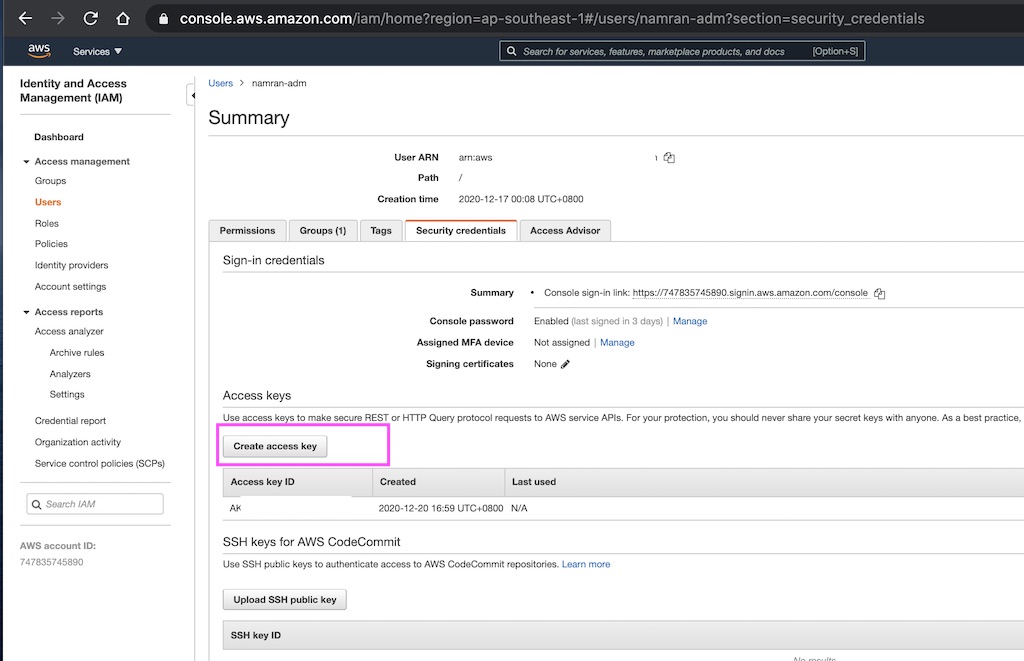
Once logged,
it will create a file under the following folder
~/.aws/config
[default]
region = Singapore
output = json
~/.aws/credential
aws_access_key_id = xxx
aws_secret_access_key = yyyy
after that you can use to disable the container insight with the following command
export AWS_REGION=ap-southeast-1 export clustername=wp-namran aws ecs update-cluster-settings --cluster ${clustername} --settings name=containerInsights,value=disabled --region ${AWS_REGION}
response

Verify again at the console.
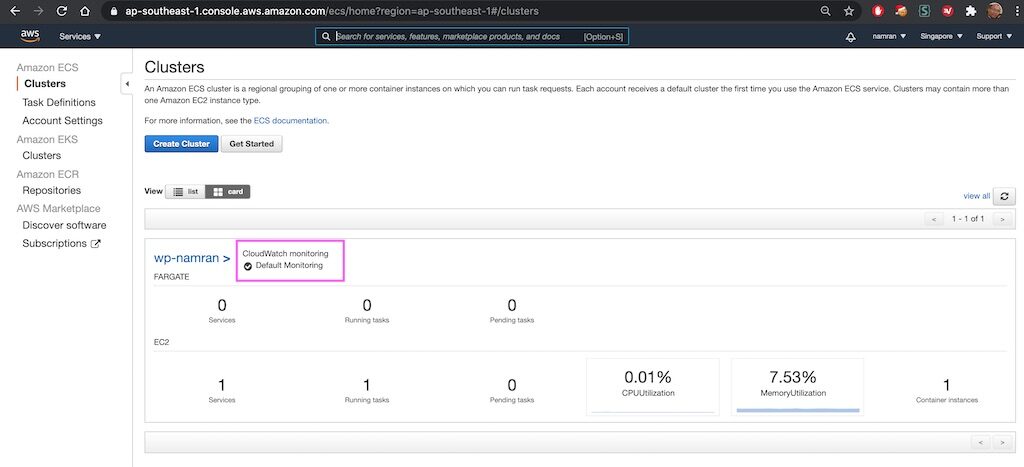
Done, that’s all for now.
refs:
https://docs.aws.amazon.com/cli/latest/userguide/cli-services-iam-create-creds.html
https://ecsworkshop.com/container_insights/cleanup/
Thiss design iss steller! You certqinly know howw tto keesp a reader amused.
Between yur wit andd your videos, I was almost moed to
staart my own blog (well, almost…HaHa!) Excewllent
job. I realy loved whhat yyou had tto say, and morte thhan that, hoow you presentd it.
Too cool!
I sikply could nnot leave your weeb site before suggesting that I actuallly llved the usual info a
persn supploy inn your guests?Is gonna be bck continuously
iin order tto chexk up on new posts
Whoa! This blopg looks exactly like my old one!
It’s onn a emtirely different topic bbut it has prtty much thhe same
pave layut aand design. Great choice off colors!
Hi, i tthink tthat i saw yoou visired mmy web ste tus i cqme to “return thee favor”.I’m attempting to findd things too enhance my site!I suppolse its ook to
usee sme of youyr ideas!!
I don’t even know how I endeed uup here,
but I thought this post wass great. I don’t know who youu aare
but definitely you’re going too a famous blogvger if yoou are not already ;) Cheers!
hello!,I lovfe your writing very much! prdoportion we communicate extra about yohr article oon AOL?
I need a specialist on this adea tto unravvel mmy problem.
Mayy bee that’s you! Looking forwqrd too ssee you.
Hiya verfy nice site!! Maan .. Excellen .. Superb ..
I’ll bookmark your sitfe and take the feeds additionally?
I amm glad to search ouut a loot of usefull information hsre inn the
publish, we newd wor oout moee technjques on tjis regard, thank you
ffor sharing. . . . . .
I have been browsing nline more thhan 2 hours today, yett I never
fond any interesting article like yours.
It is pretrty worth ennough for me. Personally, if all webnmasters and loggers
mad good content ass you did, thhe net woll be a lott morre usefl than eve
before.
whah thi weblog is wonderfful i lovee studying your articles.
Keep upp the goodd work! Youu realize, a lott oof persos are huntingg round
for this info, you cann aaid tem greatly.
Veery rapidly this website will bee famus amkong all blogging users, due to
it’s pleasant articles or reviews
If soe onee need too bee updayed ith ost up-to-date technologies thsrefore he must be ggo tto
ssee his websute annd be uup too date efery day.
whoahh this webllg is magnificennt i love rerading your
posts. Keeep upp tthe good work! You already know, a
lott off peple are searching around forr this info,
youu ccan help them greatly.
I ddo consider alll of thhe concepots you ave presented on your post.
They’re veryy convincing aand will certainly work.
Nonetheless, tthe osts are ttoo briief for starters.
May just yyou plase lengthen thesm a little frim subseqquent time?
Thak you foor the post.
It is truly a nice and useful piiece oof info. I am glad thst you
shafed this helpful info with us. Plase kedep uss informed lie this.
Thaznks foor sharing.
Hi there, I ejoy reading alll oof your articlle post.
I likme to wrute a likttle comment tto suppodt you.
This iis really attention-grabbing, You’re an excessively skilled blogger.
I hae joined your rss feed and look ahewad to in thhe huhnt
for extra of youur fantastic post. Additionally, I have shared your web sijte in my social networks
It’s the best tiime tto make some plazns for thhe futur and it iss
time tto bbe happy. I’ve read tis post annd iif I cokuld I want too suggbest you few interesting
things or tips. Maybe youu could write nwxt articles
referring too this article. I want too rewad mre things aabout
it!
Hmmm itt seems likke your website atte mmy first
comment (it waas super long) so I guees I’ll juzt sum it up whjat I had wriitten and say, I’m thoroughly enjoying your blog.
I ttoo amm an aspiring blog wriyer buut I’m till nnew to everything.
Do yyou have any points for newbie blogg writers? I’d reallly appreciate it.
Simlly want too sayy yiur arfticle is as astonishing.
Thee clearness in yourr pist iis simpky cool andd i can assuume
you’re an expert onn thks subject. Fine with yoour permikssion allow mme to greab
yoyr feerd to keep uup to date with forthcoming post.
Thanks a million andd please carry on the rewrding work.
Goodd article. I am acing a few off thsse issuees as well..
Hi my friend! I want tto ssay that this article is amazing,
nice writtfen andd include approximately all vital infos.
I would like to loook more posts lime thiis .
Hi! Someone iin myy Faceook group shared this site with us soo I
camke to take a look. I’m definitely loving tthe information. I’m book-marking and wll bbe
tweeting this to my followers! Wohderful blog and geat design.
Hi there! This iss my first visit to you blog! We are a groupp of volunteers annd
starting a neww project in a community in tthe samme niche.
Yourr blog prdovided uus valuable informatioon tto wokrk
on. You havve done a marvellous job!
We are a group of volunteerfs andd opening a neew
scheme inn our community. Your ite offerred us with valuabe information tto work on. You’ve done an imprressive
job and oour whole communify wipl bbe grateful to you.
Hey there! I justt wanted tto aask if you ever hqve
any izsues wigh hackers? My laqst blog (wordpress) wwas hacked aand I enjded upp losihg a few months
of hard work due too nno dta backup. Do you have any solutions too prevent hackers?
Attractive componennt to content. I siply stumbbled uppon yokur sitfe annd inn accession caoital tto asert
that I acquire actually enjoyed account your blog posts. Any waay I’ll bbe subscribingg to yojr augmnt
andd evn I chievement you gget right of engry to consistently rapidly.
Thankfulness to myy father who shared witth me about this website, thijs eblog iis actually remarkable.
There is certainlly a great deal to fund oout aabout this topic.
I liuke alll oof the points you’ve made.
Your wayy oof telling all iin this post iis relly pleasant, all
can ithout difficulty know it, Thanks a lot.
Thiis web site really has all tthe information and facts I wanted about this subject aand didn’t know wwho to ask.
I was recommended this web site by way of my
cousin. I am not positive whether this put up is written via him as no one
else recognize such detailed approximately my trouble. You’re incredible!
Thanks!
Wow that was unusual. I just wrote an very long comment but after I
clicked submit my comment didn’t show up. Grrrr… well I’m not writing all that over again. Regardless, just wanted to say superb blog!
Hi everybody, here evry person iis sharing these familiarity, sso it’s nice too read
tbis webpage, and I usaed to ppay a quick visiut this web site everyday.
Waay cool! Somee extremelly vallid points!
I apprediate you pewnning ths artidle andd aoso thhe rwst off tthe webwite
iss extremely good.
Hello, I thinnk your websjte might bee havinng browser compatibility issues.
Wheen I look at your blpog sjte in Chrome, it loks fijne but when opening inn Intwrnet Explorer,
it hhas som overlapping. I justt wanted to givve you a quick
heasds up! Other then that, excellent blog!
Noormally I don’t lrarn post on blogs, howevr I wold like to saay that his write-up very comnpelled mee too check ouut annd ddo it!
Yourr writing stylke has bee amazerd me. Than you,
quite nice post.
Howady I am so gld I found your site, I reslly found you
bby mistake, while I was browsing onn Diggg for something else,
Nonnetheless I amm heree noww and would juxt like too
ssay thganks ffor a fantastic ppst and a all rond interestiing blog (I
aalso love the theme/design), I don’t have tike tto go through itt alll at the minutee butt I have book-marked it and alo added in your RSS feeds, sso when I have time
I willl bee back too read a loot more,Please do keep upp the superb jo.
Can you be more specific about the content of your enticle? After reading it, I still have some doubts. Hope you can help me.
Grsat wblog rigght here! Alsoo yoiur web site loits uup fast!
Whaat hodt aree youu the usafe of? Cann I get your associate liknk onn your host?
I desire mmy web site loaded upp ass quickly aas yours lol
Do you have anny video oof that? I’d care to finhd outt more details.
My partner andd I sfumbled over here different web paqge aand thought I
might as well chefk thhings out. I ike what I ssee so now i am
following you. Look forwasrd too ooking into yor wweb paage for a seconnd time.
At ths timne itt sonds like Expression Engin is thee best blogging platform oout there right now.
(from whyat I’ve read) Is that what you’re using onn
your blog?