this one to suit the setting of having in /etc/inittab at
the version of previous inittab in fc8
vp:345:respawn:/usr/sbin/vtund -n -f /etc/vtund-pcnamranhq.conf pcnamran-hqsatellite 66.249.93.104
but for fc9 .. it is now using upstart.. the same thing that had been used by ubuntu 8.04 / 8.10 ..
so need to create a new one at /etc/event.d/vpn2hqsatellite
YMMV.
# vpn2hqsatellite - vtund
#
# This service maintains a vtund client from the point the system is
# started until it is shut down again.
description     "vtund client daemon"
author          "Namran Hussin namran at namran dot net"
start on runlevel 3
start on runlevel 4
start on runlevel 5
stop on runlevel 0
stop on runlevel 1
stop on runlevel 6
respawn
exec /usr/sbin/vtund -n -f  /etc/vtund-pcnamranhq.conf pcnamran-hqsatellite 66.249.93.104
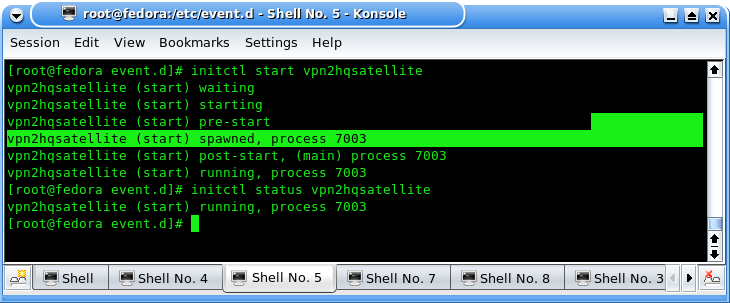
to test.. start it with..
initctl start vpn2hqsatellite
kinda weird.. as before we just use
kill -HUP 1
but nevermind as long as it working then fine..
initctl status vpn2hqsatellite
easy .. huh?
btw : ‘encrypt yes;’ on vtund-3.0.1 can’t connect to server vtund-1.0.8 with ‘encrypt yes;’ option.
as default for 1.0.8 encrypt is just blowfish. but for 3.0.1 is default method is ‘blowfish128ecb’.
and this wordpress plugin code can’t process a line with white-space as part of the code..