23 thoughts on “Decompilation & Disassembly prohibited..”
I had encountered the same trouble!
now,could you settle it?
Espero hallar la solución a este problema
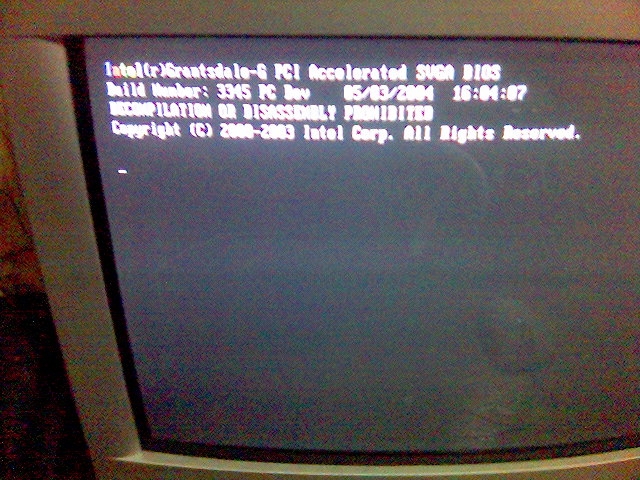
I encountered this screen, I had just installed a 4 new DDR2 ram modules. One had an error. The computer worked fine when I removed it.
yeah.. same as mine .. this was happening when adding new RAM module.. because not so properly inserted to the slot.. *sigh*
same pr
It happens to me when I try to open linux but not with windows….
is nothing to do with linux or windows.. this happening before the OS even loaded up…lah.
Hi, I am getting this error message while starting Windows. Not able to get rid of it. Can anyone help me? I have also tried to remove & re-insert the RAM as well. Do I need to do something else as well or I am missing something. Please email me on [email protected]… Thanks so much for your help.
try replacing the RAM with the tested as ‘working’ one..
somehow this message ..
kinda related to defective RAM.. or loose connection in there..
yes this is the same problem which apprears on my computer screen what should i do to make my computer work well please reply me
Hello!
I’ve just encountered the same problem. I’m not the used to working on the PC. Someone sent it to me with the specified problem.
Could you help me resolve it?
Josue MANUEL
lo he solucionado quitando la pila de la bios un rato, y despues trasteando esta, y al fin he podido instalar el XP y quitar el W98 de un vetusto ordenata, aunque me sigue apareciendo el dichoso mensaje nada mas arrancar, pero funciona de p.m.
Saludos.
MY COMPUTER NOT WORKING PLEAS HELP
ON SCREEN MSG INTEL (R) Q33/Q35/G33 PCI ACCELERATED SVGA BIOS DECOMPILATION OR DISSEMBLY PROHIBITED
Hi Everyone, how are you? This morning I have tried to turn the laptop on and I fond this writing in the laptop too. I take away the battery and insert it again, the same with hardware,m but still the same problem. What should i do???
thank you.
gençler nedir bu hata?çözümü var m?d?r?yok mudur?yard?m edecek biri yok mu yahu?
Hey my system suffers from the same problem. Can any one help me if u have any suggestion for this problem then reply on [email protected] please guys help me
I had the same problem. It’s very easy to repair: Just stop the computer, unplug the power cord, remove all the memory modules from the mother board, start the computer, stop the computer, replace all the memory modules, restart the computer.
Then It should be OK.
same problem
solucione el problema muy facilmente, rece 4 padrenuestros, 8 avemarias y listo, funciona
perdon tb cambie el monitor y solucionado el problema
Shut down the PC, unplug the power cord and hold the power button in for 15 seconds.
Open the case and remove the cmos battery for 15 Minutes (note the polarity of the battery before removal) Replace the battery if it is 3-5 years old. Reinsert the battery after 15 Minutes, close the case and plug it in, then do the following before doing anything else.
Power up the PC
* Watch the keyboard lights. When they flash, tap the F2 key
* The message, Entering Setup should appear
* Down arrow to Maintenance
* Choose Load Defaults
* Click Continue – Restore factory defaults
Restart the PC, see if the message is gone.
Just turn off your computer, unplug power cord then plug it back in, open your computer and press Del. as fast and as much as you can, some computer might be F2 or F10. Then you are in BIOS, dont need 2 do anything, just save and exit.
I have alos faced this problem. One RAM module was faulty when I removed and checked, System was working fine.
2 MP.. hehehe.. bought at Kota Sri Mutiara (Billion) Kota Bharu…. RM 500/= come together with USB cable, headset, charger, and 1Gb M2 Memory card… uhuhuh.. Related posts: How to
If you missed the blast during its early days .. see here. http://www.lowyat.net/v2/latest/maybank2u-reverts-to-classic-etiqa-suffers-defacement.html and now.. the mayban2ku is fully operational with fast & new look .. seem like no one
My Dear.. If I recalled correcly.. you’re the one who dare to poke me around at my secondary school (SMIP).. while I was scouting around as a School Prefact ..
I had encountered the same trouble!
now,could you settle it?
Espero hallar la solución a este problema
I encountered this screen, I had just installed a 4 new DDR2 ram modules. One had an error. The computer worked fine when I removed it.
yeah.. same as mine .. this was happening when adding new RAM module.. because not so properly inserted to the slot.. *sigh*
same pr
It happens to me when I try to open linux but not with windows….
is nothing to do with linux or windows.. this happening before the OS even loaded up…lah.
Hi, I am getting this error message while starting Windows. Not able to get rid of it. Can anyone help me? I have also tried to remove & re-insert the RAM as well. Do I need to do something else as well or I am missing something. Please email me on [email protected]… Thanks so much for your help.
try replacing the RAM with the tested as ‘working’ one..
somehow this message ..
kinda related to defective RAM.. or loose connection in there..
yes this is the same problem which apprears on my computer screen what should i do to make my computer work well please reply me
Hello!
I’ve just encountered the same problem. I’m not the used to working on the PC. Someone sent it to me with the specified problem.
Could you help me resolve it?
Josue MANUEL
lo he solucionado quitando la pila de la bios un rato, y despues trasteando esta, y al fin he podido instalar el XP y quitar el W98 de un vetusto ordenata, aunque me sigue apareciendo el dichoso mensaje nada mas arrancar, pero funciona de p.m.
Saludos.
MY COMPUTER NOT WORKING PLEAS HELP
ON SCREEN MSG INTEL (R) Q33/Q35/G33 PCI ACCELERATED SVGA BIOS DECOMPILATION OR DISSEMBLY PROHIBITED
Hi Everyone, how are you? This morning I have tried to turn the laptop on and I fond this writing in the laptop too. I take away the battery and insert it again, the same with hardware,m but still the same problem. What should i do???
thank you.
gençler nedir bu hata?çözümü var m?d?r?yok mudur?yard?m edecek biri yok mu yahu?
Hey my system suffers from the same problem. Can any one help me if u have any suggestion for this problem then reply on [email protected] please guys help me
hi guys there is the solution, good luck
http://en.community.dell.com/support-forums/desktop/f/3514/p/18701213/18824199.aspx
I had the same problem. It’s very easy to repair: Just stop the computer, unplug the power cord, remove all the memory modules from the mother board, start the computer, stop the computer, replace all the memory modules, restart the computer.
Then It should be OK.
same problem
solucione el problema muy facilmente, rece 4 padrenuestros, 8 avemarias y listo, funciona
perdon tb cambie el monitor y solucionado el problema
Shut down the PC, unplug the power cord and hold the power button in for 15 seconds.
Open the case and remove the cmos battery for 15 Minutes (note the polarity of the battery before removal) Replace the battery if it is 3-5 years old. Reinsert the battery after 15 Minutes, close the case and plug it in, then do the following before doing anything else.
Power up the PC
* Watch the keyboard lights. When they flash, tap the F2 key
* The message, Entering Setup should appear
* Down arrow to Maintenance
* Choose Load Defaults
* Click Continue – Restore factory defaults
Restart the PC, see if the message is gone.
Just turn off your computer, unplug power cord then plug it back in, open your computer and press Del. as fast and as much as you can, some computer might be F2 or F10. Then you are in BIOS, dont need 2 do anything, just save and exit.
I have alos faced this problem. One RAM module was faulty when I removed and checked, System was working fine.